Tuesday, June 16, 2015

Heap Sort

Heap sort divides its input into a sorted and an unsorted region, and it iteratively shrinks the unsorted region by extracting the largest element and moving that to the sorted region. The improvement consists of the use of a heap data structure rather than a linear-time search to find the maximum.(Wikipedia)

Worst case performance - O(n log n)

Heap sort
C++
void heap_sort(int array[],int heap_size){
    build_max_heap(array,heap_size);
    for (int i = heap_size; i > 0; i--) {
        swap(array,0, i);
        heap_size = heap_size - 1;
        max_heapify(array, 0,heap_size);
    }
}

void build_max_heap(int array[], int heap_size){
    for (int i = heap_size / 2; i >= 0; i--){
        max_heapify(array, i,heap_size);
    }
}

void max_heapify(int array[], int i,int heap_size){
    int l = left(i);
    int r = right(i);
    int largest;
    if (l <= heap_size && array[l] > array[i]){
        largest = l;
    }
    else{
        largest = i;
    }
    if (r <= heap_size && array[r] > array[largest]){
        largest = r;
    }
    if (largest != i){
        swap(array,i, largest);
        max_heapify(array, largest,heap_size);
    }
}

int left(int i){
    return 2 * i;
}

int right(int i){
    return 2 * i + 1;
}

void swap(int array[], int i, int j)
{
    int temp = array[i];
    array[i] = array[j];
    array[j] = temp;
}

Java
    public void heap_sort(int[] array) {
        build_max_heap(array);
        for (int i = heap_size; i > 0; i--) {
            swap(0, i);
            heap_size = heap_size - 1;
            max_heapify(array, 0);
        }
    }
   
    public void build_max_heap(int[] array) {
        heap_size = array.length - 1;
        for (int i = heap_size / 2; i >= 0; i--) {
            max_heapify(array, i);
        }
    }
   
    public void max_heapify(int[] array, int i) {
        int l = left(i);
        int r = right(i);
        int largest;
        if (l <= heap_size && array[l] > array[i]) {
            largest = l;
        } else {
            largest = i;
        }
        if (r <= heap_size && array[r] > array[largest]) {
            largest = r;
        }
        if (largest != i) {
            swap(i, largest);
            max_heapify(array, largest);
        }
    }
   
    public int left(int i) {
        return 2 * i;
    }
   
    public int right(int i) {
        return 2 * i + 1;
    }
   
    public void swap(int i, int j) {
        int temp = array[i];
        array[i] = array[j];
        array[j] = temp;
    }
Matlab
function array = heap_sort(array)
    heap_size = numel(array);
    array = build_max_heap(array,heap_size);
    for i = numel(array):-1:2
        array([i 1]) = array([1 i]);
        heap_size = heap_size - 1;
        array = max_heapify(array,heap_size,1);
    end
end

function array = build_max_heap(array,heap_size)
    for i = floor(heap_size/2):-1:1
        array = max_heapify(array,heap_size,i);
    end
end

function array = max_heapify(array,heap_size,i)
    l = left(i);
    r = right(i);
    if l <= heap_size && array(l) > array(i)
        largest = l;
    else
        largest = i;
    end
    if r <= heap_size && array(r) > array(largest)
        largest = r;
    end
    if largest ~= i
        array([largest i]) = array([i largest]);
        array = max_heapify(array,heap_size,largest);
    end
end

function l = left(i)
    l = 2 * i;
end

function r = right(i)
    r = 2 * i + 1;
end
Python
import math

def left(i):
    return 2*i

def right(i):
    return 2*i+1

def max_heapify(array,heap_size,i):
    l = left(i)
    r = right(i)
    if l <= heap_size and array[l] > array[i]:
        largest = l
    else:
        largest = i
    if r <= heap_size and array[r] > array[largest]:
        largest = r
    if largest != i:
        array[largest],array[i] = array[i],array[largest]
        max_heapify(array,heap_size,largest)

def build_max_heap(array,heap_size):
    for i in range(math.floor(heap_size/2),-1,-1):
        max_heapify(array,heap_size,i)

def heap_sort(array):
    heap_size = len(array)- 1
    build_max_heap(array,heap_size)
    for i in range(heap_size,0,-1):
        array[i],array[0] = array[0],array[i]
        heap_size = heap_size - 1
        max_heapify(array,heap_size,0)

Monday, June 1, 2015

Quick Sort

Quicksort is a divide and conquer algorithm. Quicksort first divides a large array into two smaller sub-arrays, the low elements and the high elements. Quicksort can then recursively sort the sub-arrays. (Wikipedia)

Worst case performance - O(n^2)
Source - Wikipedia
 C++
void quick_sort(int array[], int low, int high)
{
    if (low < high)
    {
        int q = partition(array, low, high);
        quick_sort(array, low, q - 1);
        quick_sort(array, q + 1, high);
    }
}

int partition(int array[], int low, int high)
{
    int pivot = array[high];
    int i = low - 1;
    for (int j = low; j < high; j++)
    {
        if (array[j] <= pivot)
        {
            i++;
            swap(array, i, j);
        }
    }
    swap(array, i + 1, high);
    return i + 1;
}

void swap(int array[], int i, int j)
{
    int temp = array[i];
    array[i] = array[j];
    array[j] = temp;
}
Java
public void quick_sort(int[] array, int low, int high) {
    if (low < high) {
        int q = partition(array, low, high);
        quick_sort(array, low, q - 1);
        quick_sort(array, q + 1, high);
    }
}

public int partition(int[] array, int low, int high) {
    int pivot = array[high];
    int i = low - 1;
    for (int j = low; j < high; j++) {
        if (array[j] <= pivot) {
            i++;
            swap(array, i, j);
        }
    }
    swap(array, i + 1, high);
    return i + 1;
}

public void swap(int[] array, int i, int j) {
    int temp = array[i];
    array[i] = array[j];
    array[j] = temp;
}
Matlab
function array = quick_sort(array,low,high)
    if(low < high)
        [array,q] = partition(array, low, high);
        array = quick_sort(array, low, q - 1);
        array = quick_sort(array, q + 1, high);
    end
end

function [array,q] = partition(array,low,high)
    pivot = array(high);
    i = low - 1;
    for j= low : high - 1
        if (array(j) <= pivot)
            i = i + 1;
            array([j i]) = array([i j]);
        end
    end
    array([high i+1]) = array([i+1 high]);
    q = i + 1;
end
Python
def partition(array,low,high):
    pivot = array[high]
    i = low - 1
    for j in range(low,high):
        if array[j] <= pivot:
            i = i + 1
            array[i],array[j] = array[j],array[i]
    array[i+1],array[high] = array[high],array[i+1]
    return i+1

def quick_sort(array,low,high):
    if low < high:
        q = partition(array,low,high)
        quick_sort(array,low,q - 1)
        quick_sort(array,q + 1,high)

Friday, April 3, 2015

Tracking the Trajectory of a mass using linear Kalman filter

The Kalman filter is an algorithm that estimates the state of a process from measured data. The word filter comes because of the estimations given for unknown variables, are more precise than noisy, inaccurate measurements taken from the environment. Kalman filter algorithm is a two stage process. The first stage (prediction) predicts the state of the system and the second stage (observation and update) updates the predicted state using the observed noisy measurements. In this post I explain an application of tracking the trajectory of a mass using linear Kalman filter. First let's have an idea about the kinematic model of a trajectory. 

trajectory
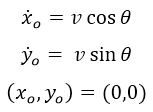
initial conditions
Initial conditions

Kinematic equations

Now, let's look at the discrete linear Kalman filter equations.

discrete linear kalman filter equations
process model

observation model
intial prediction
assumptions

Matlab code
 clear all; close all; clc;  
 N = 145; % no of iterations  
   
 %% parameters  
 v = 100; % initial velocity  
 T = 14.42096; % flight duration  
 deltaT = 0.1; % time slice  
 g = 9.80665;   
 theta = pi/4; % angle from the ground  
 F = [1 deltaT 0 0; 0 1 0 0; 0 0 1 deltaT; 0 0 0 1]; % state transition model  
 B = [0 0 0 0; 0 0 0 0; 0 0 1 0; 0 0 0 1]; % control input matrix  
 u = [0; 0; 0.5*(-g)*(deltaT^2); (-g)*deltaT]; % control vector  
 H = [1 0 0 0; 0 0 1 0]; % observation matrix  
 phat = eye(4); % initial predicted estimate covariance  
 Q = zeros(4); % process covariance  
 R = 0.2*eye(2); % measurement error covariance  
 xhat = [0; v*cos(theta); 200; v*sin(theta)]; % initial estimate  
 x_estimate = xhat;  
   
 %% system model  
 t = 0:deltaT:T;  
 x_sys = zeros(2,N);  
 x_sys(1,:) = v*cos(theta)*t ;  
 x_sys(2,:) = v*(sin(theta)*t)-(0.5*g*(t.^2));  
   
 %% noisy measurements  
 sigma = 25;  
 z = x_sys + sigma*randn(2,N);  
   
 %% kalman filter  
 for i=1:N  
   % prediction  
   x_pred = F*xhat + B*u; % project the state ahead  
   p_pred = F*phat*F' + Q; % project the error covariance  
     
   % observation and update  
   kalman_gain = (p_pred*H')/(H*p_pred*H'+R); % compute the Kalman gain  
   xhat = x_pred + kalman_gain*(z(:,i)-H*x_pred); % update estimate with measurement z  
   phat = (eye(4)-kalman_gain*H)*p_pred; % update error covariance   
   x_estimate = [x_estimate xhat]; %#ok[agrow] (to ignore array grow in loop warning)  
 end  
   
 %% plot results  
 figure; hold on;  
 plot(x_sys(1,:),x_sys(2,:),'k');  
 plot(z(1,:),z(2,:),'.b');  
 plot(x_estimate(1,:),x_estimate(3,:),'--r');  
   
 xlabel('X (meters)');  
 ylabel('Y (meters)');  
 title('Trajectory with linear Kalman filter');  
 legend('System model', 'Measured', 'Estimated');  
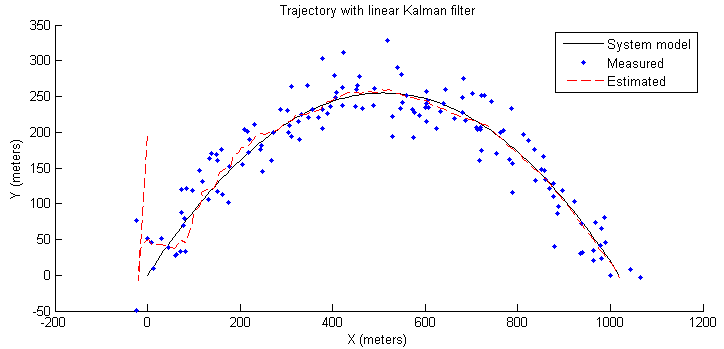
simulation results
Simulation Results
 * You can download the matlab file from here.

Friday, March 27, 2015

How to add an echo effect to an audio signal using Matlab

In this post I explain how to add an echo to an audio signal using Matlab. If you closely look at the below code, you can understand, what kind of a process is there. Initially the original signal x is delayed by 0.5 seconds and then multiplied by the attenuation constant alpha(0.65) to reduce the amplitude of the echo signal. Finally the delayed and attenuated signal is added back to the original signal to get the echo effect of the audio signal. You can visualize this process using the below mentioned Matlab simulink model.

Matlab code
 clear all;  
 %% Hallelujah Chorus  
 [x,Fs] = audioread('Hallelujah.wav');  
 sound(x,Fs);  
 pause(10);  
 delay = 0.5; % 0.5s delay  
 alpha = 0.65; % echo strength  
 D = delay*Fs;  
 y = zeros(size(x));  
 y(1:D) = x(1:D);  
   
 for i=D+1:length(x)  
   y(i) = x(i) + alpha*x(i-D);  
 end  
   
 %% using filter method.  
 % b = [1,zeros(1,D),alpha];  
 % y = filter(b,1,x);  
   
 %% echoed Hallelujah Chorus  
 sound(y,Fs);  
 * You can download Hallelujah.wav from here or else you can find more .wav files from WavSource.com. Varying the value of alpha would change the echo strength of the audio signal.

compare original and echo audio in audacity
Original and echoed audio signals in Audacity

You can create the Matlab simulink model for echo generation as follows.

echo sound simulink model
Matlab simulink model for echo generation
Model parameters
  • From Multimedia File 
samples per audio channel - 8192
Audio output sampling mode - Frame based
Audio output data type - double
  • Gain
 Gain - 0.65
  • Delay
Delay length - 4096
Input Processing - Columns as channels (frame based)
* If you use any other .wav file other than Hallelujah.wav, then you should change the above parameters accordingly.

Friday, March 20, 2015

Frequency Divider

A frequency divider, also called a clock divider or scaler or prescaler, is a circuit that takes an input signal of a frequency, fin, and generates an output signal of a frequency :

Source - Wikipedia

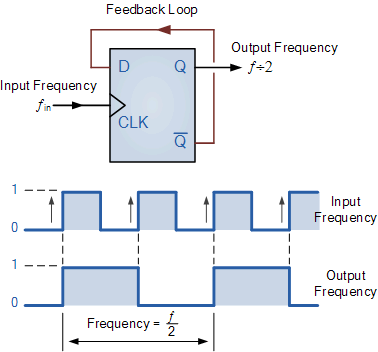
Where n is an integer (Wikipedia). In this post I explain how to implement the digital design of a simple clock divider(fin/2).

Source - ElectronicsTutorials


Verilog module
 module clock_divider (clk_in, enable,reset, clk_out);  
   input clk_in; // input clock  
   input reset;  
   input enable;  
   output clk_out; // output clock  
   
   wire  clk_in;  
   wire  enable;  
   
   reg clk_out;  
   
   always @ (posedge clk_in)  
     if (reset)  
       begin  
         clk_out <= 1'b0;  
       end  
     else if (enable)  
       begin  
         clk_out <= !clk_out ;  
       end  
   
 endmodule  
Test-bench
 module tb_clock_divider;  
   reg clk_in, reset,enable;  
   wire clk_out;  
     
   clock_divider U0 (  
    .clk_in (clk_in),  
    .enable(enable),  
    .reset (reset),  
    .clk_out (clk_out)  
   );  
     
   initial  
     begin  
       clk_in = 0;  
       reset = 0;  
       enable = 1;  
       #10 reset = 1;  
       #10 reset = 0;  
       #100 $finish;  
     end  
       
   always #5 clk_in = ~clk_in;  
     
 endmodule  
vivado simulation results
Simulation results
elaborated design
Elaborated design


Verilog simulation and RTL analysis was done in Vivado 2014.2. If you want to divide the input frequency further, (fin/4, fin/8, fin/16), you can extend the same circuit as follows.
 
Source - ElectronicsTutorials

Tuesday, March 17, 2015

Merge Sort

The basic idea of the algorithm is to split the collection into smaller groups by halving it until the groups only have one element or no elements (which are both entirely sorted groups). Then merge the groups back together so that their elements are in order (Rosetta code). Merge sort follows divide-and-conquer approach.

Worst case performance - O(n log n)

merge sort
Source - Wikipedia
 C++
 void merge_sort(int array[], int low, int high)  
 {  
   if (low < high)  
   {  
     int middle = (low + high) / 2;  
     merge_sort(array,low, middle);  
     merge_sort(array,middle + 1, high);  
     merge(array, low, middle, high);  
   }  
 }  
   
 void merge(int array[], int low, int middle, int high)  
 {  
   int size1 = middle - low + 1;  
   int size2 = high - middle;  
   int left[size1 + 1];  
   int right[size2 + 1];  
   for (int i = 0; i < size1; i++)  
   {  
     left[i] = array[low + i];  
   }  
   for (int j = 0; j < size2; j++)  
   {  
     right[j] = array[middle + j + 1];  
   }  
   left[size1] = numeric_limits<int>::max();;  
   right[size2] = numeric_limits<int>::max();;  
   int i = 0;  
   int j = 0;  
   for (int k = low; k <= high; k++)  
   {  
     if (left[i] <= right[j])  
     {  
       array[k] = left[i];  
       i++;  
     }  
     else  
     {  
       array[k] = right[j];  
       j++;  
     }  
   }  
 }   
Java
   static int[] array = {5, 4, 8, 3, 1, 2, 9, 6, 7, 10};  
   
   static void merge_sort(int[] array, int low, int high) {  
       if (low < high) {  
         int middle = (low + high) / 2;  
         merge_sort(array, low, middle);  
         merge_sort(array, middle + 1, high);  
         merge(array, low, middle, high);  
       }  
    }  
   
   static void merge(int[] array, int low, int middle, int high) {  
       int size1 = middle - low + 1;  
       int size2 = high - middle;  
       int[] left = new int[size1 + 1];  
       int[] right = new int[size2 + 1];  
       for (int i = 0; i < size1; i++) {  
         left[i] = array[low + i];  
       }  
       for (int j = 0; j < size2; j++) {  
         right[j] = array[middle + j + 1];  
       }  
       left[size1] = Integer.MAX_VALUE;  
       right[size2] = Integer.MAX_VALUE;  
       int i = 0;  
       int j = 0;  
       for (int k = low; k <= high; k++) {  
         if (left[i] <= right[j]) {  
           array[k] = left[i];  
           i++;  
         } else {  
           array[k] = right[j];  
           j++;  
         }  
       }  
    }  
Matlab
   function array = merge_sort(array,low,high)  
     if(low < high)  
       middle = floor((low + high)/2);  
       array = merge_sort(array,low, middle);  
       array = merge_sort(array,middle + 1, high);  
       array = merge(array, low, middle, high);  
     end  
   end  
   
   function array = merge(array,low,middle,high)  
     size1 = middle - low + 1;  
     size2 = high - middle;  
     left = zeros(1,size1+1);  
     right = zeros(1,size2+1);  
     for i=1:size1  
       left(i) = array(low+i-1);  
     end  
     for j=1:size2  
       right(j) = array(middle+j);  
     end  
     left(size1+1) = inf;  
     right(size2+1) = inf;  
     i = 1;  
     j = 1;  
     for k=low:high  
       if left(i)<= right(j)  
         array(k) = left(i);  
         i = i + 1;  
       else  
         array(k) = right(j);  
         j = j + 1;  
       end  
     end  
   end   
Python 
import math

def merge(array,low,middle,high):
    size1 = middle - low + 1
    size2 = high - middle
    left = [0]* (size1+1)
    right = [0]* (size2+1)
    for i in range(size1):
        left[i] = array[low+i]
    for j in range(size2):
        right[j] = array[middle+j+1]
    left[size1] = float("inf")
    right[size2] = float("inf")
    i = 0
    j = 0
    for k in range(low,high+1):
        if left[i]<= right[j]:
            array[k] = left[i]
            i = i + 1
        else:
            array[k] = right[j]
            j = j + 1
   
def merge_sort(array,low,high):
    if low<high:
        middle = int(math.floor((low+high)/2))
        merge_sort(array,low,middle)
        merge_sort(array,middle+1,high)
        merge(array,low,middle,high)