Tuesday, December 29, 2020

Christmas Decoration using Arduino Mega 2560

In this post I will show you how to make a Christmas decoration with blinking LEDs and a background music using Arduino Mega 2560.


You need to connect piezo buzzer to the 12th pin and LEDs from 22 to 52 pins as configured in the code.

LEDs should connect to Arduino pins based on the levels shown below. 

As shown in the video you can use similar STAR using plastic sheet to pin 21 LEDs for this decoration.

Note: In order to change the brightness of LEDs and sound of the buzzer, use appropriate resistors serial with load. (Eg : 220 ohm resister for each LED and 100 ohm resister for buzzer)

You can see which LED will fall into which level from the Arduino code.

Music was generated using Arduino tone function. After each note, one LED level will be switched ON, while others remain OFF, which will be continued throughout the entire song.

Music notes frequencies were generated by the formula mentioned in below reference.

https://pages.mtu.edu/~suits/NoteFreqCalcs.html

Here, in order to understand how each note plays, notes were written one by one, which makes the code bigger.

If you are sure about the musical notes, just place them in an array, along with weights of each note in a similar size another array, and play them using tone function inside a for loop.

Eg:  

// Musical Notes
#define G1 196
#define A1 220
#define B1 247
#define C 261
#define D 294
#define E 329
#define F 349
#define G 392
#define A 440
#define B 493
#define C2 523

int notes = {G, G, G, C, B, ....}

int weights = {0.5, 0.5, 1, 1, 2, ....}


Arduino Code

// Musical Notes
#define G1 196
#define A1 220
#define B1 247
#define C 261
#define D 294
#define E 329
#define F 349
#define G 392
#define A 440
#define B 493
#define C2 523

//#define blink_delay 500
#define tone_delay 250

#define SP 12 //Speaker

#define L1 22 // Mid LED

#define L2 24 // 1st Level LEDs
#define L3 26
#define L4 28
#define L5 30
#define L6 32

#define L7 34 // 2nd Level LEDs
#define L8 36
#define L9 38
#define L10 40
#define L11 42
#define L12 44
#define L13 46
#define L14 48
#define L15 50
#define L16 52

#define L17 31 // Outer LEDs
#define L18 33
#define L19 35
#define L20 37
#define L21 39

int leds[] = {L1, L2, L3, L4, L5, L6, L7, L8, L9, L10, L11, L12, L13, L14, L15, L16, L17, L18, L19, L20, L21};
int NUM_LEDS = 21;

void setup() {
  pinMode(SP, OUTPUT);
  for (int i = 0; i < NUM_LEDS; i++) {
    pinMode(leds[i], OUTPUT);
  }
}

void lights_on() {
  for (int i = 0; i < NUM_LEDS; i++) {
    digitalWrite(leds[i], HIGH);
  }
}

void lights_off() {
  for (int i = 0; i < NUM_LEDS; i++) {
    digitalWrite(leds[i], LOW);
  }
}

void lights_blink_1(int blink_delay) {
  lights_off();
  delay(blink_delay / 4);
  lights_on();
  delay(blink_delay / 4);
  lights_off();
  delay(blink_delay / 4);
  digitalWrite(L1, HIGH);
  delay(blink_delay / 4);
}

void lights_blink_2(int blink_delay) {
  lights_off();
  delay(blink_delay / 4);
  lights_on();
  delay(blink_delay / 4);
  lights_off();
  delay(blink_delay / 4);
  for (int i = 1; i < 6; i++) {
    digitalWrite(leds[i], HIGH);
  }
  delay(blink_delay / 4);
}

void lights_blink_3(int blink_delay) {
  lights_off();
  delay(blink_delay / 4);
  lights_on();
  delay(blink_delay / 4);
  lights_off();
  delay(blink_delay / 4);
  for (int i = 6; i < 16; i++) {
    digitalWrite(leds[i], HIGH);
  }
  delay(blink_delay / 4);
}

void lights_blink_4(int blink_delay) {
  lights_off();
  delay(blink_delay / 4);
  lights_on();
  delay(blink_delay / 4);
  lights_off();
  delay(blink_delay / 4);
  for (int i = 16; i < 21; i++) {
    digitalWrite(leds[i], HIGH);
  }
  delay(blink_delay / 4);
  lights_on();
}


void loop() {
  // Jingle Bells
  lights_on();
  lights_blink_1(tone_delay * 4 * 1.3); tone(SP,E, tone_delay * 1);
  lights_blink_2(tone_delay * 1 * 1.3); tone(SP,E, tone_delay * 1);
  lights_blink_3(tone_delay * 1 * 1.3); tone(SP,E, tone_delay * 2);

  // Jingle Bells
  lights_blink_4(tone_delay * 2 * 1.3); tone(SP,E, tone_delay * 1);
  lights_blink_1(tone_delay * 1 * 1.3); tone(SP,E, tone_delay * 1);
  lights_blink_2(tone_delay * 1 * 1.3); tone(SP,E, tone_delay * 2);

  // Jingle all the
  lights_blink_3(tone_delay * 2 * 1.3); tone(SP,E, tone_delay * 1);
  lights_blink_4(tone_delay * 1 * 1.3); tone(SP,G, tone_delay * 1);
  lights_blink_1(tone_delay * 1 * 1.3); tone(SP,C, tone_delay * 1);
  lights_blink_2(tone_delay * 1 * 1.3); tone(SP,D, tone_delay * 0.5);

  // way
  lights_blink_3(tone_delay * 0.5 * 1.3); tone(SP,E, tone_delay * 4);

  // Oh what fun it
  lights_blink_4(tone_delay * 4 * 1.3); tone(SP,F, tone_delay * 1);
  lights_blink_1(tone_delay * 1 * 1.3); tone(SP,F, tone_delay * 1);
  lights_blink_2(tone_delay * 1 * 1.3); tone(SP,F, tone_delay * 1);
  lights_blink_3(tone_delay * 1 * 1.3); tone(SP,F, tone_delay * 0.5);

  // is to ride in a
  lights_blink_4(tone_delay * 0.5 * 1.3); tone(SP,F, tone_delay * 1);
  lights_blink_1(tone_delay * 1 * 1.3); tone(SP,E, tone_delay * 1);
  lights_blink_2(tone_delay * 1 * 1.3); tone(SP,E, tone_delay * 1);
  lights_blink_3(tone_delay * 1 * 1.3); tone(SP,E, tone_delay * 0.5);
  lights_blink_4(tone_delay * 0.5 * 1.3); tone(SP,E, tone_delay * 0.5);

  // One horse o-pen
  lights_blink_1(tone_delay * 0.5 * 1.3); tone(SP,E, tone_delay * 1);
  lights_blink_2(tone_delay * 1 * 1.3); tone(SP,D, tone_delay * 1);
  lights_blink_3(tone_delay * 1 * 1.3); tone(SP,D, tone_delay * 1);
  lights_blink_4(tone_delay * 1 * 1.3); tone(SP,E, tone_delay * 1);

  // Sleigh
  lights_blink_1(tone_delay * 1 * 1.3); tone(SP,D, tone_delay * 2);
  lights_blink_2(tone_delay * 2 * 1.3); tone(SP,G, tone_delay * 2);

  // Jingle Bells
  lights_blink_3(tone_delay * 2 * 1.3); tone(SP,E, tone_delay * 1);
  lights_blink_4(tone_delay * 1 * 1.3); tone(SP,E, tone_delay * 1);
  lights_blink_1(tone_delay * 1 * 1.3); tone(SP,E, tone_delay * 2);

  // Jingle Bells
  lights_blink_2(tone_delay * 2 * 1.3); tone(SP,E, tone_delay * 1);
  lights_blink_3(tone_delay * 1 * 1.3); tone(SP,E, tone_delay * 1);
  lights_blink_4(tone_delay * 1 * 1.3); tone(SP,E, tone_delay * 2);

  // Jingle all the
  lights_blink_1(tone_delay * 2 * 1.3); tone(SP,E, tone_delay * 1);
  lights_blink_2(tone_delay * 1 * 1.3); tone(SP,G, tone_delay * 1);
  lights_blink_3(tone_delay * 1 * 1.3); tone(SP,C, tone_delay * 1);
  lights_blink_4(tone_delay * 1 * 1.3); tone(SP,D, tone_delay * 0.5);

  // way
  lights_blink_1(tone_delay * 0.5 * 1.3); tone(SP,E, tone_delay * 4);

  // Oh what fun it
  lights_blink_2(tone_delay * 4 * 1.3); tone(SP,F, tone_delay * 1);
  lights_blink_3(tone_delay * 1 * 1.3); tone(SP,F, tone_delay * 1);
  lights_blink_4(tone_delay * 1 * 1.3); tone(SP,F, tone_delay * 1);
  lights_blink_1(tone_delay * 1 * 1.3); tone(SP,F, tone_delay * 0.5);

  // is to ride in a
  lights_blink_2(tone_delay * 0.5 * 1.3); tone(SP,F, tone_delay * 1);
  lights_blink_3(tone_delay * 1 * 1.3); tone(SP,E, tone_delay * 1);
  lights_blink_4(tone_delay * 1 * 1.3); tone(SP,E, tone_delay * 1);
  lights_blink_1(tone_delay * 1 * 1.3); tone(SP,E, tone_delay * 0.5);
  lights_blink_2(tone_delay * 0.5 * 1.3); tone(SP,E, tone_delay * 0.5);

  // One horse o-pen
  lights_blink_3(tone_delay * 0.5 * 1.3); tone(SP,G, tone_delay * 1);
  lights_blink_4(tone_delay * 1 * 1.3); tone(SP,G, tone_delay * 1);
  lights_blink_1(tone_delay * 1 * 1.3); tone(SP,F, tone_delay * 1);
  lights_blink_2(tone_delay * 1 * 1.3); tone(SP,D, tone_delay * 1);

  // Sleigh
  lights_blink_3(tone_delay * 1 * 1.3); tone(SP,C, tone_delay * 4);

  // Dashing through the
  lights_blink_4(tone_delay * 4 * 1.3); tone(SP,G1, tone_delay * 1);
  lights_blink_1(tone_delay * 1 * 1.3); tone(SP,E, tone_delay * 1);
  lights_blink_2(tone_delay * 1 * 1.3); tone(SP,D, tone_delay * 1);
  lights_blink_3(tone_delay * 1 * 1.3); tone(SP,C, tone_delay * 1);

  // Snow in a
  lights_blink_4(tone_delay * 1 * 1.3); tone(SP,G1, tone_delay * 2);
  lights_blink_1(tone_delay * 2 * 1.3); tone(SP,G1, tone_delay * 0.5);
  lights_blink_2(tone_delay * 0.5 * 1.3); tone(SP,G1, tone_delay * 0.5);

  // One horse o-pen
  lights_blink_3(tone_delay * 0.5 * 1.3); tone(SP,G1, tone_delay * 1);
  lights_blink_4(tone_delay * 1 * 1.3); tone(SP,E, tone_delay * 1);
  lights_blink_1(tone_delay * 1 * 1.3); tone(SP,D, tone_delay * 1);
  lights_blink_2(tone_delay * 1 * 1.3); tone(SP,C, tone_delay * 1);

  // Sleigh
  lights_blink_3(tone_delay * 1 * 1.3); tone(SP,A1, tone_delay * 4);

  // Through the field we
  lights_blink_4(tone_delay * 4 * 1.3); tone(SP,A1, tone_delay * 1);
  lights_blink_1(tone_delay * 1 * 1.3); tone(SP,F, tone_delay * 1);
  lights_blink_2(tone_delay * 1 * 1.3); tone(SP,E, tone_delay * 1);
  lights_blink_3(tone_delay * 1 * 1.3); tone(SP,D, tone_delay * 1);

  // Go
  lights_blink_4(tone_delay * 1 * 1.3); tone(SP,B1, tone_delay * 4);

  // Laughing all the
  lights_blink_1(tone_delay * 4 * 1.3); tone(SP,G, tone_delay * 1);
  lights_blink_2(tone_delay * 1 * 1.3); tone(SP,G, tone_delay * 1);
  lights_blink_3(tone_delay * 1 * 1.3); tone(SP,F, tone_delay * 1);
  lights_blink_4(tone_delay * 1 * 1.3); tone(SP,D, tone_delay * 1);

  // way
  lights_blink_1(tone_delay * 1 * 1.3); tone(SP,E, tone_delay * 4);

  // Bells on Bob tail
  lights_blink_2(tone_delay * 4 * 1.3); tone(SP,G1, tone_delay * 1);
  lights_blink_3(tone_delay * 1 * 1.3); tone(SP,E, tone_delay * 1);
  lights_blink_4(tone_delay * 1 * 1.3); tone(SP,D, tone_delay * 1);
  lights_blink_1(tone_delay * 1 * 1.3); tone(SP,C, tone_delay * 1);

  // ring
  lights_blink_2(tone_delay * 1 * 1.3); tone(SP,A1, tone_delay * 4);

  // Making spirits
  lights_blink_3(tone_delay * 4 * 1.3); tone(SP,G1, tone_delay * 1);
  lights_blink_4(tone_delay * 1 * 1.3); tone(SP,E, tone_delay * 1);
  lights_blink_1(tone_delay * 1 * 1.3); tone(SP,D, tone_delay * 1);
  lights_blink_2(tone_delay * 1 * 1.3); tone(SP,C, tone_delay * 1);

  // Bright What
  lights_blink_3(tone_delay * 1 * 1.3); tone(SP,A1, tone_delay * 2);
  lights_blink_4(tone_delay * 2 * 1.3); tone(SP,A1, tone_delay * 1);

  // Fun it is to
  lights_blink_1(tone_delay * 1 * 1.3); tone(SP,A1, tone_delay * 1);
  lights_blink_2(tone_delay * 1 * 1.3); tone(SP,F, tone_delay * 1);
  lights_blink_3(tone_delay * 1 * 1.3); tone(SP,E, tone_delay * 1);
  lights_blink_4(tone_delay * 1 * 1.3); tone(SP,D, tone_delay * 1);

  // ride and sing a
  lights_blink_1(tone_delay * 1 * 1.3); tone(SP,G, tone_delay * 1);
  lights_blink_2(tone_delay * 1 * 1.3); tone(SP,G, tone_delay * 1);
  lights_blink_3(tone_delay * 1 * 1.3); tone(SP,G, tone_delay * 1);
  lights_blink_4(tone_delay * 1 * 1.3); tone(SP,G, tone_delay * 1);

  // Sleighing song to
  lights_blink_1(tone_delay * 1 * 1.3); tone(SP,A, tone_delay * 1);
  lights_blink_2(tone_delay * 1 * 1.3); tone(SP,F, tone_delay * 1);
  lights_blink_3(tone_delay * 1 * 1.3); tone(SP,E, tone_delay * 1);
  lights_blink_4(tone_delay * 1 * 1.3); tone(SP,D, tone_delay * 1);

  // Night
  lights_blink_1(tone_delay * 1 * 1.3); tone(SP,C, tone_delay * 4);
}


Sunday, August 9, 2015

Bucket Sort

Bucket sort, or bin sort, is a sorting algorithm that works by partitioning an array into a number of buckets. Each bucket is then sorted individually, either using a different sorting algorithm, or by recursively applying the bucket sorting algorithm. (Wikipedia)

Worst case performance - O(n^2)

Bucket Sort
C++
void bucket_sort(int array[], int length)
{
    int k = max_value(array,length);
    int bucket[k+1];
    for(int i=0; i<=k; i++)
    {
        bucket[i] = 0;
    }
    for(int j=0; j<length; j++)
    {
        bucket[array[j]]++;
    }
    int index = 0;
    for (int i=0; i<=k; i++)
    {
        for (int j=0; j<bucket[i]; j++)
        {
            array[index++]=i;
        }
    }
}

int max_value(int array[], int length)
{
    int max = 0;
    for (int i = 0; i < length; i++)
        if (max < array[i])
            max = array[i];
    return max;
}
Java
public int[] bucket_sort(int[] array) {
    int k = max_value(array);
    int[] bucket = new int[k+1];
    for (int j = 0; j < array.length; j++) {
        bucket[array[j]]++;
    }
    int index = 0;
    for (int i = 0; i < bucket.length; i++) {
        for (int j = 0; j < bucket[i]; j++) {
            array[index++] = i;
        }
    }
    return array;
}

public int max_value(int[] array) {
    int max = 0;
    for (int i = 0; i < array.length; i++) {
        if (max < array[i]) {
            max = array[i];
        }
    }
    return max;
}
Matlab
function array = bucket_sort(array)
    k = max(array);
    bucket = zeros(1,k+1);
    B = zeros(1,numel(array));
    for j = 1:numel(array)
        bucket(array(j)) = bucket(array(j)) + 1;
    end
    index = 1;
    for i = 1:k+1
        for j = 1:bucket(i)
            array(index) = i;
            index = index + 1;
        end
    end
end
Python
def bucket_sort(array):
    k = max(array)
    bucket = [0]* (k+1)
    for j in range(len(array)):
        bucket[array[j]] = bucket[array[j]] + 1
    index = 0
    for i in range(k+1):
        for j in range(bucket[i]):
            array[index] = i
            index = index + 1

Friday, August 7, 2015

Shell Sort

Shell sort is an in-place comparison sort. It can be seen as either a generalization of sorting by exchange (bubble sort) or sorting by insertion (insertion sort). Shell sort starts by sorting pairs of elements far apart from each other, then progressively reducing the gap between elements to be compared. (Wikipedia)

Worst case performance - O(n^2)
Shell sort

C++
void shell_sort(int array[], int length)
{
    for (int gap = length/2; gap > 0; gap /= 2)
    {
        for (int i = gap; i < length; i += 1)
        {
            int temp = array[i];
            int j;
            for (j = i; j >= gap && array[j - gap] > temp; j -= gap)
                array[j] = array[j - gap];
            array[j] = temp;
        }
    }
}
Java
     public int[] shell_sort(int[] array) {
        for (int gap = array.length / 2; gap > 0; gap /= 2) {
            for (int i = gap; i < array.length; i += 1) {
                int temp = array[i];
                int j;
                for (j = i; j >= gap && array[j - gap] > temp; j -= gap) {
                    array[j] = array[j - gap];
                }
                array[j] = temp;
            }
        }
        return array;
    } 
Matlab
function array = shell_sort(array)
    length = numel(array);
    gap = floor(length/2);
    while gap > 0
        for i = gap+1:length
            temp = array(i);
            j = i;
            while (j >= gap+1) && (array(j-gap) > temp)
                array(j) = array(j-gap);
                j = j - gap;
            end
            array(j) = temp;
        end
        gap = floor(gap/2);
    end
end
Python
import math

def shell_sort(array):
    length = len(array)
    gap = math.floor(length/2)
    while gap > 0:
        for i in range(gap,length):
            temp = array[i]
            j = i
            while (j >= gap) and (array[j - gap] > temp):
                array[j] = array[j-gap]
                j = j - gap
            array[j] = temp
        gap = math.floor(gap/2)
 

Thursday, August 6, 2015

Comb Sort

Comb sort is a comparison sorting algorithm improves on Bubble sort. The basic idea is to eliminate turtles, or small values near the end of the list, since in a bubble sort these slow the sorting down tremendously. (Wikipedia)
Comb Sort
Worst case performance - O(n^2)

C++
void comb_sort(int array[], int length)
{
    int gap = length;
    bool swapped = true;
    while((gap > 1) || (swapped == true))
    {
        gap /= 1.25;
        if (gap < 1)
        {
            gap = 1;
        }
        int i = 0;
        swapped = false;
        while (i + gap < length)
        {
            if (array[i] > array[i + gap])
            {
                int temp = array[i];
                array[i] = array[i + gap];
                array[i + gap] = temp;
                swapped = true;
            }
            i++;
        }
    }
Java
      public int[] comb_sort(int[] array) {
        int gap = array.length;
        boolean swapped = true;
        while ((gap > 1) || (swapped == true)) {
            gap /= 1.25;
            if (gap < 1) {
                gap = 1;
            }
            int i = 0;
            swapped = false;
            while (i + gap < array.length) {
                if (array[i] > array[i + gap]) {
                    int temp = array[i];
                    array[i] = array[i + gap];
                    array[i + gap] = temp;
                    swapped = true;
                }
                i++;
            }
        }
        return array;
    }
Matlab
function array = comb_sort(array)
    gap = numel(array);
    swapped = true;
    while (gap > 1) || swapped
        gap = floor(gap/1.25);
        if gap < 1
            gap = 1;
        end
        i = 1;
        swapped = false;
        while (i+gap-1) < numel(array)
            if array(i) > array(i+gap)
                array([i i+gap]) = array([i+gap i]);
                swapped = true;
            end
            i = i + 1;
        end
    end
end
Python
import math

def comb_sort(array):
    gap = len(array)
    swapped = True
    while gap > 1 or swapped :
        gap = math.floor(gap/1.25)
        if gap < 1 :
            gap = 1
        i = 0
        swapped = False
        while (i+gap)< len(array):
            if array[i] > array[i + gap]:
                temp = array[i]
                array[i] = array[i + gap]
                array[i + gap] = temp
                swapped = True
            i = i + 1

Saturday, August 1, 2015

Digital design of systolic array architecture for matrix multiplication

Systolic architecture consists of an array of processing elements, where data flows between neighboring elements, synchronously, from different directions. Processing element takes data from Top, Left and output the results to Right, Bottom.    
One of the key application of Systolic architecture is matrix multiplication. Here each processing element performs four operations, namely FETCH, MULTIPLICATION, SHIFT & ADDITION. As following figure depicts, "in_a", "in_b" are inputs to the processing element and "out_a", "out_b" are outputs to the processing element. "out_c" is to get the output result of each processing element.
Processing elements are arranged in the form of an array. In this case we analyze, multiplication of 3x3 matrices, which can be easily extended. Let say the two matrices are A and B. Following figure depicts how matrix A and B are fed into PE(processing element) array. 
Simulation of following matrices are as follows.
Verilog modules
module top(clk,reset,a1,a2,a3,b1,b2,b3,c1,c2,c3,c4,c5,c6,c7,c8,c9);

 parameter data_size=8;
 input wire clk,reset;
 input wire [data_size-1:0] a1,a2,a3,b1,b2,b3;
 output wire [2*data_size:0] c1,c2,c3,c4,c5,c6,c7,c8,c9;
 
 wire [data_size-1:0] a12,a23,a45,a56,a78,a89,b14,b25,b36,b47,b58,b69;
 
 pe pe1 (.clk(clk), .reset(reset), .in_a(a1), .in_b(b1), .out_a(a12), .out_b(b14), .out_c(c1));
 pe pe2 (.clk(clk), .reset(reset), .in_a(a12), .in_b(b2), .out_a(a23), .out_b(b25), .out_c(c2));
 pe pe3 (.clk(clk), .reset(reset), .in_a(a23), .in_b(b3), .out_a(), .out_b(b36), .out_c(c3));
 pe pe4 (.clk(clk), .reset(reset), .in_a(a2), .in_b(b14), .out_a(a45), .out_b(b47), .out_c(c4));
 pe pe5 (.clk(clk), .reset(reset), .in_a(a45), .in_b(b25), .out_a(a56), .out_b(b58), .out_c(c5));
 pe pe6 (.clk(clk), .reset(reset), .in_a(a56), .in_b(b36), .out_a(), .out_b(b69), .out_c(c6));
 pe pe7 (.clk(clk), .reset(reset), .in_a(a3), .in_b(b47), .out_a(a78), .out_b(), .out_c(c7));
 pe pe8 (.clk(clk), .reset(reset), .in_a(a78), .in_b(b58), .out_a(a89), .out_b(), .out_c(c8));
 pe pe9 (.clk(clk), .reset(reset), .in_a(a89), .in_b(b69), .out_a(), .out_b(), .out_c(c9));

endmodule

module pe(clk,reset,in_a,in_b,out_a,out_b,out_c);

 parameter data_size=8;
 input wire reset,clk;
 input wire [data_size-1:0] in_a,in_b;
 output reg [2*data_size:0] out_c;
 output reg [data_size-1:0] out_a,out_b;

 always @(posedge clk)begin
    if(reset) begin
      out_a=0;
      out_b=0;
      out_c=0;
    end
    else begin  
      out_c=out_c+in_a*in_b;
      out_a=in_a;
      out_b=in_b;
    end
 end
 
endmodule

Test-bench
module test;

 // Inputs
 reg clk;
 reg reset;
 reg [7:0] a1;
 reg [7:0] a2;
 reg [7:0] a3;
 reg [7:0] b1;
 reg [7:0] b2;
 reg [7:0] b3;

 // Outputs
 wire [16:0] c1;
 wire [16:0] c2;
 wire [16:0] c3;
 wire [16:0] c4;
 wire [16:0] c5;
 wire [16:0] c6;
 wire [16:0] c7;
 wire [16:0] c8;
 wire [16:0] c9;

 // Instantiate the Unit Under Test (UUT)
 top uut (
  .clk(clk), 
  .reset(reset), 
  .a1(a1), 
  .a2(a2), 
  .a3(a3), 
  .b1(b1), 
  .b2(b2), 
  .b3(b3), 
  .c1(c1), 
  .c2(c2), 
  .c3(c3), 
  .c4(c4), 
  .c5(c5), 
  .c6(c6), 
  .c7(c7), 
  .c8(c8), 
  .c9(c9)
 );

 initial begin
  // Initialize Inputs
  clk = 0;
  reset = 0;
  a1 = 0;
  a2 = 0;
  a3 = 0;
  b1 = 0;
  b2 = 0;
  b3 = 0;

  // Wait 100 ns for global reset to finish
  #5 reset = 1;
  #5 reset = 0;
  #5;  a1 = 1; a2 = 0; a3 = 0; b1 = 2; b2 = 0; b3 = 0;
  #10; a1 = 2; a2 = 4; a3 = 0; b1 = 4; b2 = 1; b3 = 0;
  #10; a1 = 3; a2 = 5; a3 = 7; b1 = 6; b2 = 5; b3 = 3;
  #10; a1 = 0; a2 = 6; a3 = 8; b1 = 0; b2 = 9; b3 = 7;
  #10; a1 = 0; a2 = 0; a3 = 9; b1 = 0; b2 = 0; b3 = 8;
  #10; a1 = 0; a2 = 0; a3 = 0; b1 = 0; b2 = 0; b3 = 0;
  #100;
  $stop;

 end
 
 initial begin
  forever #5 clk = ~clk;
 end
      
endmodule

Simulation results 
Output results can be seen after 6 clock periods from the time of data insertion. (time period between a1 gets 1 and the time of yellow marker). In usual case for 3x3 matrix multiplication altogether, it takes 3x3x3 = 27 times to do the iterations and calculations. But in this case it takes lesser time (x6 times), because systolic architecture is a class of parallel pipe-lined architecture. Here is the synthesis report and timing constraints of the RTL.


Target device - xc3s500e-4fg320
Tool used - Xilinx ISE 14.3
Now lets analyze the timing differences between above hardware design and the algorithm written in C++.

C++ 
#include<iostream>

using namespace std;

int main()
{
    int a[3][3] =
    {
        {1, 2, 3},
        {4, 5, 6},
        {7, 8, 9}
    };
    int b[3][3] =
    {
        {2, 1, 3},
        {4, 5, 7},
        {6, 9, 8}
    };
    int c[3][3];

    int sum;

    for(int i = 0; i < 3; i++)
    {
        for(int j = 0; j < 3; j++)
        {
            sum = 0;
            for(int k = 0; k < 3; k++)
            {
                sum += a[i][k] * b[k][j];
            }
            c[i][j] = sum;
        }
    }

    for(int i = 0; i < 3; i++)
    {
        for(int j = 0; j < 3; j++)
        {
            cout <<c[i][j]<<" ";
        }
        cout << endl;
    }
    return 0;
}
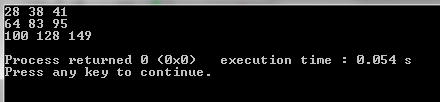
Output results

C++ execution time = 0.054s
Total delay of digital design = 7.765ns x 6 =   46.59ns 

Tuesday, July 21, 2015

Radix Sort

The idea of explained Radix Sort is to do digit by digit sort starting from least significant digit to most significant digit.

Worst case performance - O(n.k/d)

Radix sort
 C++
void radix_sort(int array[], int length)
{
    int k = max_value(array,length);
    for (int base = 1; k/base > 0; base *= 10)
        counting_sort(array,length,base);
}

void counting_sort(int array[], int length, int base)
{
    int C[10] = {0};
    int B[length];
    for (int j = 0; j < length; j++)
        C[(array[j]/base)%10]++;
    for (int i = 1; i < 10; i++)
        C[i] = C[i] + C[i - 1];
    for (int j = length - 1; j >= 0; j--)
    {
        B[C[(array[j]/base)%10] - 1] = array[j];
        C[(array[j]/base)%10]--;
    }
    for (int i = 0; i < length; i++)
        array[i] = B[i];
}

int max_value(int array[], int length)
{
    int max = 0;
    for (int i = 0; i < length; i++)
        if (max < array[i])
            max = array[i];
    return max;
Java
public int[] radix_sort(int[] array) {
    int k = max_value(array);
    for (int base = 1; k / base > 0; base *= 10) {
        array = counting_sort(array, base);
    }
    return array;
}
public int[] counting_sort(int[] array, int base) {
    int[] C = new int[10];
    int[] B = new int[array.length];
    for (int j = 0; j < array.length; j++) {
        C[(array[j]/base)%10]++;
    }
    for (int i = 1; i < 10; i++) {
        C[i] = C[i] + C[i - 1];
    }
    for (int j = array.length - 1; j >= 0; j--) {
        B[C[(array[j]/base)%10] - 1] = array[j];
        C[(array[j]/base)%10]--;
    }
    return B;
}
public int max_value(int[] array) {
    int max = 0;
    for (int i = 0; i < array.length; i++) {
        if (max < array[i]) {
            max = array[i];
        }
    }
    return max;
Matlab
function array = radix_sort(array)
k = max(array);
base = 1;
while k/base > 0
    array = counting_sort(array,base);
    base = base * 10;
end

    function B = counting_sort(array,base)
        C = zeros(1,11);
        B = zeros(1,numel(array));
        for j = 1:numel(array)
            C(rem(floor(array(j)/base),10)+1) = C(rem(floor(array(j)/base),10)+1) + 1;
        end
        for i = 2:11
            C(i) = C(i) + C(i-1);
        end
        for j = numel(array):-1:1
            B(C(rem(floor(array(j)/base),10)+1)) = array(j);
            C(rem(floor(array(j)/base),10)+1) = C(rem(floor(array(j)/base),10)+1) - 1;
        end
    end
end 
Python
import math

def counting_sort(array,base):
    C = [0]* (10)
    B = [0]* (len(array))
    for j in range(len(array)):
        C[math.floor(array[j]/base)%10] = C[math.floor(array[j]/base)%10] + 1
    for i in range(1,10):
        C[i] = C[i] + C[i-1]
    for j in range(len(array)-1,-1,-1):
        B[C[math.floor(array[j]/base)%10] - 1] = array[j]
        C[math.floor(array[j]/base)%10] = C[math.floor(array[j]/base)%10] - 1
    for i in range(len(array)):
        array[i] = B[i]

def radix_sort(array):
    k = max(array)
    base = 1
    while(k/base > 0):
        counting_sort(array,base)
        base = base * 10 

Tuesday, July 7, 2015

Counting Sort

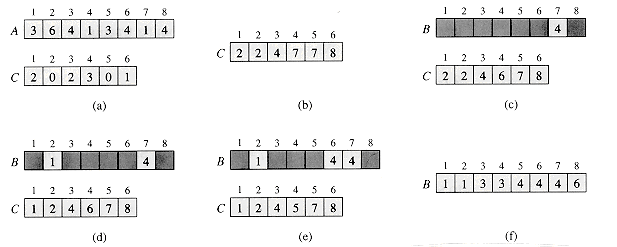
Counting sort determines, for each input element x, the number of elements less than x. It uses this information to place element x directly into its position in the output array. (Introduction to Algorithms)

Worst case performance - O(n + k)
 C++
void counting_sort(int array[], int length)
{
    int k = max_value(array,length);
    int C[k+1];
    int B[length];
    memset(C, 0, sizeof(C));
    for (int j = 0; j < length; j++)
        C[array[j]]++;
    for (int i = 1; i <= k; i++)
        C[i] = C[i] + C[i - 1];
    for (int j = length - 1; j >= 0; j--)
    {
        B[C[array[j]] - 1] = array[j];
        C[array[j]]--;
    }
    print_array(B,length);
}

int max_value(int array[], int length)
{
    int max = 0;
    for (int i = 0; i < length; i++)
        if (max < array[i])
            max = array[i];
    return max;
}

void print_array(int array[], int length)
{
    for(int i=0; i<length; i++)
        cout <<array[i]<<" ";
    cout << endl;
}
 Java
public int[] counting_sort(int[] array) {
    int k = max_value(array);
    int[] C = new int[k + 1];
    int[] B = new int[array.length];
    for (int j = 0; j < array.length; j++) {
        C[array[j]]++;
    }
    for (int i = 1; i <= k; i++) {
        C[i] = C[i] + C[i - 1];
    }
    for (int j = array.length - 1; j >= 0; j--) {
        B[C[array[j]] - 1] = array[j];
        C[array[j]]--;
    }
    return B;
}

public int max_value(int[] array) {
    int max = 0;
    for (int i = 0; i < array.length; i++) {
        if (max < array[i]) {
            max = array[i];
        }
    }
    return max;
}
 Matlab
function B = counting_sort(array)
    k = max(array);
    C = zeros(1,k+1);
    B = zeros(1,numel(array));
    for j = 1:numel(array)
        C(array(j)) = C(array(j)) + 1;
    end
    for i = 2:k+1
        C(i) = C(i) + C(i-1);
    end
    for j = numel(array):-1:1
        B(C(array(j))) = array(j);
        C(array(j)) = C(array(j)) - 1;
    end
end
 Python
def counting_sort(array):
    k = max(array)
    C = [0]* (k+1)
    B = [0]* (len(array))
    for j in range(len(array)):
        C[array[j]] = C[array[j]] + 1
    for i in range(1,k+1):
        C[i] = C[i] + C[i-1]
    for j in range(len(array)-1,-1,-1):
        B[C[array[j]] - 1] = array[j]
        C[array[j]] = C[array[j]] - 1
    print(B)